New SDU Datacenter
Last updated: March 25, 2026.
SDU is opening a new datacenter in collaboration with Danfoss and HPE (see here). As part of this, a new system will be launched which contains significant changes to both the existing providers - SDU/K8s, AAU/K8s, and AAU/VM - and the available hardware. The UCloud interface and apps will remain unchanged.
The migration to the new system entails some important attention points. This page therefore contains all the relevant information for both resource allocators and end-users.
The following terminology is used in the sections below:
Resource allocator: Front office staff at the Danish universities who allocate DeiC resources to university staff and students.
User: End-users of UCloud.
Migration: Used broadly to signify the move from the existing datacenter located at SDU to the new datacenter located in Sønderborg.
SDU/K8s,AAU/K8s,AAU/VM: The current UCloud service providers.
Key Points
The new system
The
SDU/K8sprovider will be migrated.The
AAU/K8s, andAAU/VMproviders will be decommissioned and permanently shut down.All existing machine types will be replaced by new machine types.
For resource allcators
All existing compute resource allocations will expire on April 30, 2026.
It is possible to pre-allocate resources on the new machine types already now.
For UCloud users
All data stored in the
SDU/K8sprovder will be automatically migrated to the new datacenter.Data stored in the
AAU/K8sandAAU/VMproviders must be transferred to theSDU/K8sprovider before the migration starts. This is the responsibility of the users. In complex situations, users can contact their local front office.
Timeline of the Migration
From now: Resource allocators can start allocating resources on the new machine types. The allocations should have a start date no earlier than May 1, 2026 since the machines will not physically exist in the infrastructure before that date.
Before April 27, 2026: All transfer of data stored in the
AAU/K8sandAAU/VMproviders to theSDU/K8sprovider must be complete. If not transferred before then, the data will be lost.April 27, 2026 - May 4, 2026: Downtime of all services in connection with the migration. The downtime will begin at 8:00 AM.
May 4, 2026: The migration is complete and new datacenter is fully operational.
The New System
This section elaborates further on each of the points from above.
One provider
Among the providers that exist currently, only the SDU/K8s provider will remain in the new system (possibly under a different name). This means that all data which are stored in stored in that provider will also be available after the migration.
Note
Users who have projects with only SDU/K8s storage resources will not need to do anything to migrate these projects.
The AAU/K8s and the AAU/VM providers will be decommissioned, and thus cease to exist (see the timeline above). The data stored in the AAU/K8s and in the virtual machines running in the AAU/VM provider will not be moved automatically. It is the users' responsibility to transfer the data in these two providers to the SDU/K8s provider before the deadline (see the timeline above). In complex situations where this data transfer is not straight forward, project PIs should reach out to their local front office for support.
When the data have been transferred to the SDU/K8s provider, it will be moved automatically during the migration - like the rest of the data stored in that provider.
See below for a step-by-step guide on how to transfer data from the AAU/K8s and AAU/VM providers to the SDU/K8s provider.
Important
It is the users' responsibility to transfer their data from the AAU/K8s and AAU/VM providers to the SDU/K8s provider. Data which have not been transferred before the deadline will be lost.
New hardware
The migration to the new datacenter also entails a major upgrade of the hardware in the SDU/K8s provider.
The existing CPU machine types - u1-standard and u1-fat - will be replaced by a single new CPU machine type. Likewise, the existing GPU machine types - u1-gpu, u2-gpu, and u3-gpu - will be replaced by a single new GPU machine type.
Note
The u3-gpu machine type will remain operational but only be available for SDU users after the migration. The u1-standard, u1-fat, u1-gpu and u2-gpu machine types will be decommissioned.
The new CPU machine type
The new CPU machine types will consist exclusively of AMD Zen 5 machines.
The new GPU machine type
The new GPU machine type will consist exclusively of NVIDIA B200 GPUs. These are absolute top-tier GPUs and state-of-the-art for tasks such as high-performance AI training, inference, and more. As such, they are much more computationally efficient than the GPUs thare are currently available in the infrastructure.
Aside from the new GPUs being more powerful, the total number of GPU cards will also increase compared to the number of cards currently abvailable in the SDU/K8s provider. In addition, to increase GPU avaialbility even further, it will be possible to select a fraction of a GPU at a fraction of the cost when selecting machines during job submission on UCloud. This is achieved with the NVIDIA Multi-Instance GPU (MIG) technology.
Resource allocation
This section pertains to resource allocation on the new system and is therefore mainly relevant for resource allocators.
All existing compute resource allocations for all three providers - SDU/K8s, AAU/K8s, and AAU/VM - will expire on April 30, 2026. The expirations will be forced (hence overriding any expiry dates later than April 30, 2026), and the allocations will not be renewable. Therefore, new compute resource allocations should be in place from May 1, 2026.
The new CPU- and GPU machine types have been created which means that it is already now possible to allocate resources on the new machine types. The new machine types are called:
The CPU machine type:
cpu-amd-zen5The GPU machine type:
gpu-nvidia-b200
Important
All resource allocations on the new machine types must start no earlier than May 1, 2026 since the machines will not physically exist in the infrastructure before then.
Storage allocations
Storage allocations on the SDU/K8s provider will not be forced to expire since the storage product will be migrated to new system.
Resource allocators should be aware that projects transferring data from the AAU/K8s and/or AAU/VM providers to the SDU/K8s provider may require increased storage capacity until April 30, 2026 to accommodate both existing SDU/K8s data and incoming data.
Measures will be taken to ensure sufficient storage capacity at university level during the migration period.
A note regarding GPU hours
It is worth highlighting that there will be fewer GPU hours overall starting from May 1, 2026. This must be seen in light of the new GPU machine type which is much more computationally efficient than any of the exsting GPU machine types.
The higher computational efficiency of the new GPU machine type means that projects will typically require fewer GPU hours compared to the existing GPU machine types to achieve the same comptational results. However, it is not possible to provide an authoritative scaling factor since it depends on the specific use case.
Migration of UCloud Projects
SDU/K8s projects will migrate automatically
All data stored in the current SDU/K8s datacenter will be automatically and securely transferred to the new SDU datacenter during the scheduled downtime period (see the timeline above). No action is required from users. Once UCloud becomes operational again, all files and projects will be accessible as before.
AAU/K8s projects and AAU/VM virtual machines require manual migration
As the AAU/K8s and AAU/VM providers will be decommissioned, all data currently stored in these providers must be manually transferred by the users to the SDU/K8s provider or to another appropriate location before the deadline April 27.
Important
Data stored in the AAU/K8s and AAU/VM providers which have not been transferred before April 27 will be permanently and irrecoverably deleted. It is the users' responsibility to ensure that all required data are transferred in time.
Users should be aware that transferring large volumes of data may take considerable time. It is therefore strongly recommended to initiate the migration process well in advance of the deadline to avoid any risk of data loss.
Preparation before migration
Before initiating the transfer of data, users are advised to:
Review stored data and delete files that are no longer needed.
Verify that sufficient storage capacity is available in the
SDU/K8sprovider.If necessary, apply for additional storage resources through the local front office.
Transferring Data from AAU/K8s to SDU/K8s
Data can be transferred from the AAU/K8s to the SDU/K8s provider using the transfer to functionality:
Navigate to the relevant file or folder located in the
AAU/K8sprovider.Right click the file or folder to be transfered. In the image below, the folder called
Datais being transferred.
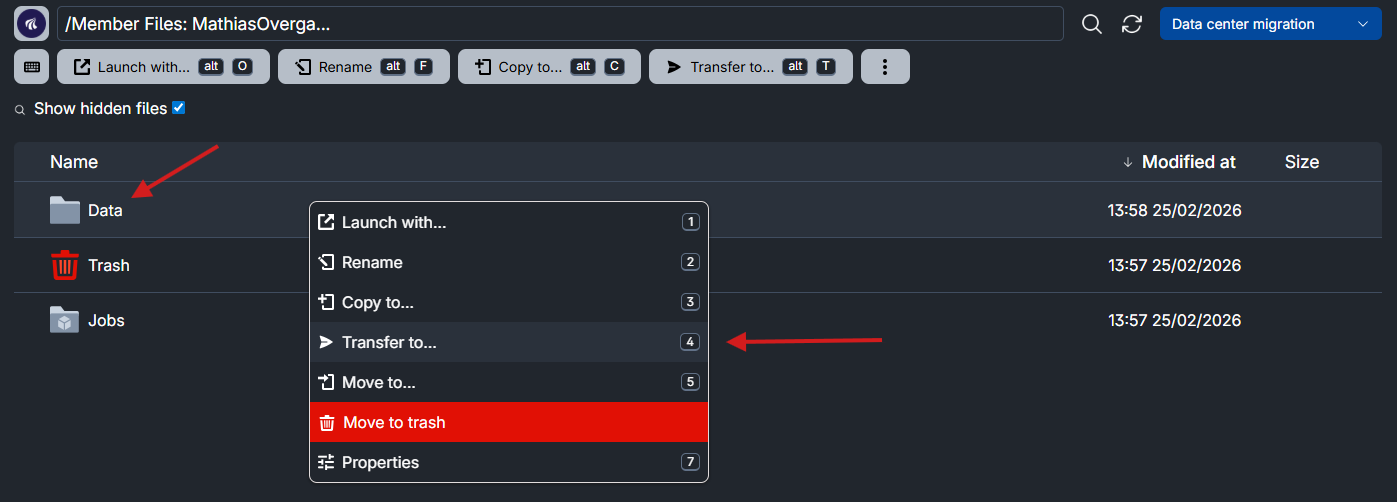
Click Transfer to... in the menu.
In the pop-up window that appears, select a
SDU/K8sdrive as the destination in the dropdown menu.
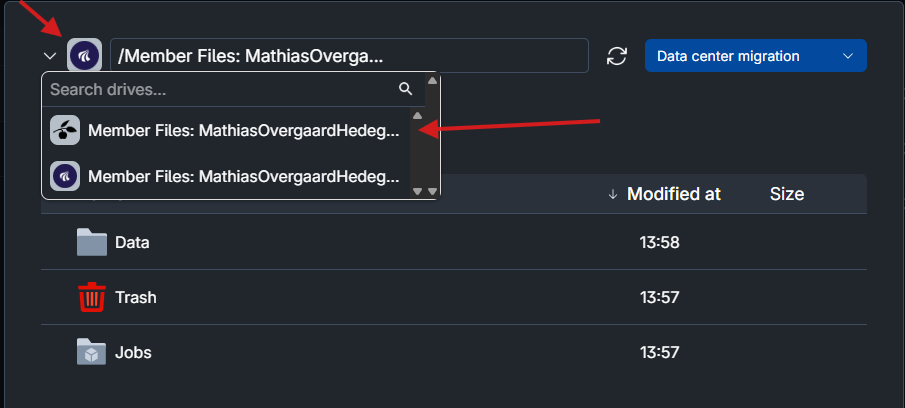
Click Transfer to initiate the transfer to the selected destination on the SDU/k8.
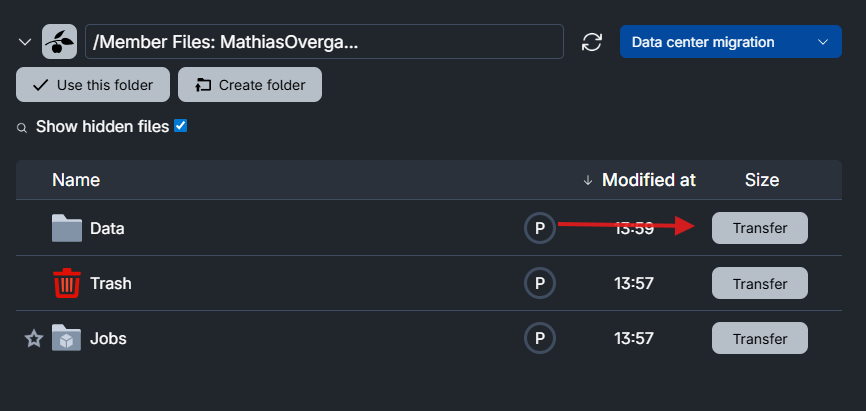
Once the transfer is complete, the files will be available in the SDU/K8s provider. The data will then be included in the automatic migration to the new SDU datacenter in accordance with the automatic migration of SDU/K8s data.
Transferring data from AAU/VM to SDU/K8s
Data stored on virtual machines from the AAU/VM provider must be transferred manually.
The example below shows one possible method to transfere your data to the SDU/K8s provider provider using scp.
Start a Terminal job on a machine type from the
SDU/K8sprovider.Generate an SSH key pair using
ssh-keygen.Add the public (i.e.,
.pub) part of the SSH key pair (denoted as<ssh-public-key>below) to~/.ssh/authorized_keysin the virtual machine running in theAAU/VMprovider:$ echo "<ssh-public-key>" >> ~/.ssh/authorized_keys
An SSH public key entry will look similar to:
ssh-ed25519 AAAAC3NzaC1lZDI1NTE5AAAAIGEbkxGSnas+sYoeU98eTxNeY/Mi3DdxFiTAq5ZQ6zOy ucloud@j-7845583-job-0
Use
scpfrom inside the Terminal job (runnuing onSDU/K8s) using the private part of the SSH key pair (denoted as<ssh-private-key>below) :To copy a single file:
$ scp -i /home/ucloud/.ssh/<ssh-private-key> ucloud@<VM-IP>:/home/ubuntu/data-file.txt .
Here,
<VM-IP>must be replaced with the IP address of the virtual machine which can be found on the VM job's progress page.This command copies
data-file.txtfrom the VM to the current working directory inside the Terminal job.To copy a directory with all its contents, use the
-roption:$ scp -i /home/ucloud/.ssh/<your_ssh_key> -r ucloud@<VM-IP>:/home/ubuntu/directory .
Contents