Creating a Cluster
A cluster can be created from the application catalog. UCloud prepares the machines, installs Kubernetes, and opens the cluster dashboard when the cluster is ready.
As a supplement to this documentation, the tutorial video demonstrates how to create a cluster.
Prerequisites
The provider must support Virtual Machines and the Kubernetes cluster application.
The workspace or project needs compute and storage resources for the control plane, the workers, and the Kubernetes API.
Open the Application
Open Apps, select Development, and choose Kubernetes.
Deployment Form
Enter a Cluster name. Use lowercase letters, digits, and single hyphens. The name can be at most 30 characters long.
Select the Service provider and the Kubernetes version. The available versions depend on the provider. Select the newest version.
Choose the Control plane machine type, the number of nodes, and the disk size. Use an odd number of nodes. Most clusters use one or three.
Choose the first Worker pool: a name, machine type, node count, and disk size. Add more pools when workloads need different machine types.
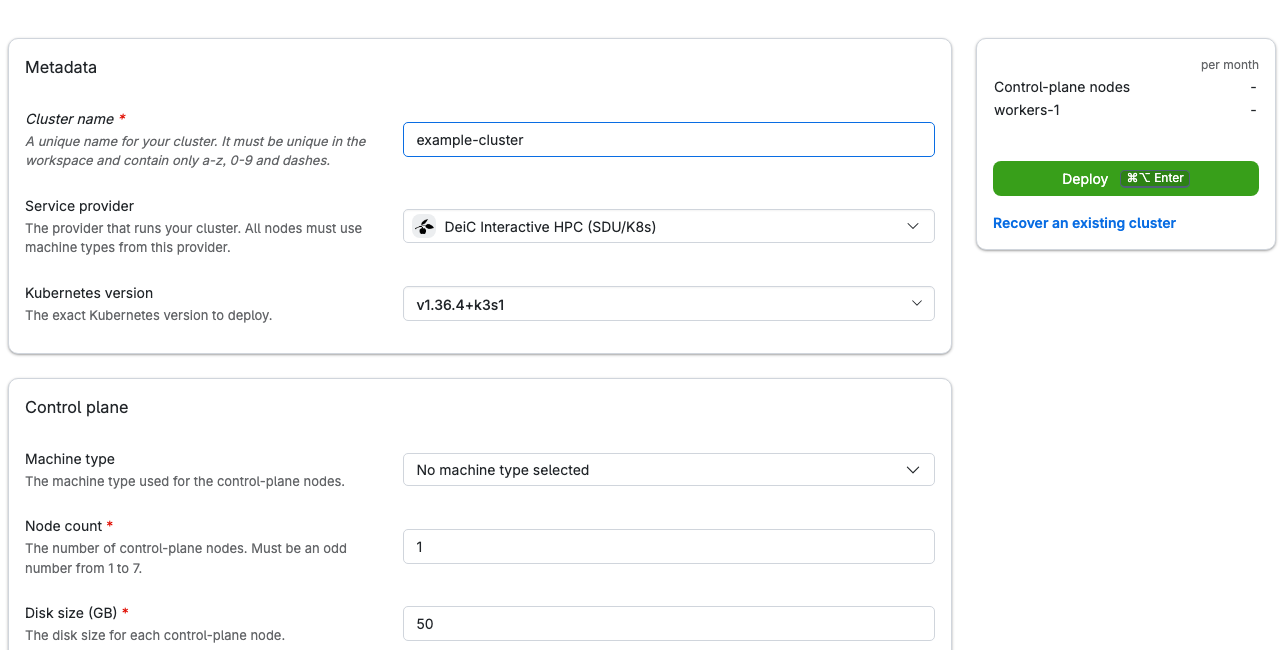
When the form is ready, select the Deploy button.
All machines of a cluster must come from the same provider. The control plane runs the Kubernetes API. The workers run workloads. A worker pool can have a different machine type from the control plane.
Wait for the Cluster
UCloud creates the cluster and its public links. The dashboard opens when the cluster is ready.
The Home page of a running cluster shows the cluster state, the number of ready nodes, and the Kubernetes version. While the cluster is provisioning, the dashboard shows the progress of the nodes and the resources that UCloud is creating. If a step fails, read the failure reason on the Home page.
Note
Automatic maintenance is enabled by default. The cluster upgrades Kubernetes and updates the operating system every Sunday from 02:00 to 06:00 UTC. The policy can be changed on the maintenance page.
Next Steps
Use the cluster dashboard to check the nodes and connect to the cluster.
Deploy an application with a Deployment, Service, and Ingress.
Connect with kubectl for command-line access.
Contents